
Using a registered Lasting Power of Attorney online continues to be a topic I am frequently asked to explain. The table below shows resource I have created so far.
Information on digitally accessing your LPA
Video: How to use the LPA Digital Access Code: a walk thorough setting up the account
How to use the LPA Digital Access Code: a walk thorough setting up the account
Blog explaining what an activation key means
Lasting Power of Attorney: What does activation key mean?
Blog explaining LPAs and activation keys
Blog explaining LPAs and Activation Keys, A step by step guide to accessing a Lasting Power of Attorney electronically
Blog explaining: How do I get a new Activation Key? (Lasting Power of Attorney)
How do I get a new Activation Key? (Lasting Power of Attorney)
Blog explaining Lasting Power of Attorney: how long does the activation code last?
Lasting Power of Attorney: how long does the activation code last?
Recent questions from many clients have prompted me to recognise that a clear, concise terminology is missing from my resource. This blog addresses that need and it’s aim is simple: to explain terms associated with online access to a Lasting Power of Attorney.
In the spirit of keeping this blog short and to point I’m not going to introduce what a Lasting Power of Attorney is, you’ll find that in the introductions in previous blogs. What I will do, however, is to set out the five terms you need to understand for the Use a Lasting Power of Attorney Service.
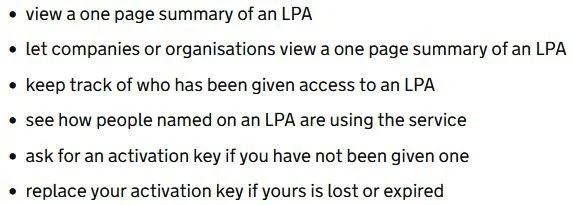
1. Use a Lasting Power of Attorney Service[i]
The Use a Lasting Power of Attorney Service enables a donor or attorney on a Lasting Power of Attorney to:
2. Activation Key
When a Lasting Power of Attorney is registered the attorneys and the donor are sent an activation key. This is in a letter from the Office of the Public Guardian.
An activation key has thirteen letters and begins with the letter C.
3. Reference Number
When a Lasting Power of Attorney is registered the attorneys and the donor are sent a reference number. This is in the same letter that the gives the Activation Key.
The reference number has 12 numbers and will start with the number seven.
4. Online account
The online account refers to GOV.UK One Login. You will need to sign in or create an online account to use a registered Lasting Power of Attorney online.
5. V-code or Access code
Once the activation key has been used you can generate access codes to share with organisations such as banks and hospitals. Access codes are unique and specific to each organisation and each code lasts for thirty days.
Access codes have thirteen letters and start with the letter V
Knowing these five terms will help you in accessing a Lasting Power of Attorney online. For more detailed instructions, please see earlier blogs.
[1] You can view the online service for Lasting Powers created after 1.2.2016
For support making your Lasting Power of Attorney contact me today.
If you have received in formation from any of the content and would like to support my ongoing work, head to Buy me a coffee – thank you